
First Steps
(The tutorials for EuroScope were all made on a computer with the OS Windows)
Hello — welcome to this quick introduction on installing EuroScope for AVO-N.
Before we start: some antivirus programs and web browsers may mistakenly identify the installer files as threats and either delete them automatically or warn you when you try to download them. If that happens, make sure to allow the files (restore them from quarantine) or click “Keep”/“Keep anyway” when your browser asks whether you really want to download the file. The installation only works if these files are allowed.
The AVO-N Network is currently supporting only one ATC Client:
EuroScope V. 3.2.9
To install the Client, you need to Download our Installer here :
https://avo-network.com/content/euroscope-installer.exe
If you had EuroScope downloaded before, you need to uninstall it. Otherwise the Installation will fail. Our Installer installs EuroScope again but with all the settings and modifications that are required for the software to work with our Network. You can still join the VATSIM Network with this EuroScope. If you have a Rating in VATSIM, you can use this EuroScope. It works perfectly fine.
How to install EuroScope with our installer?
Here a Tutorial.
- Execute the downloaded .exe file
- Click on ,,Start Setup". Everything will now automatically install for you.

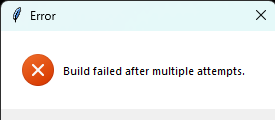
3. Wait, until everything has finished without Problems. If you get any error message that you cannot resolve yourself like in the picture below, you can join our Discord Server and ask for help our you can write an E-Mail to support@avo-network.com and we will help you.
Congratulations! You installed EuroScope!
For Sectors or connecting to our Network, look up at the next Pages!
If you need any additional help, you can join our Discord Server and ask for help our you can write an E-Mail to support@avo-network.com and we will help you like mentioned above.
No comments to display
No comments to display