
Setting Up EuroScope & Connecting to Our Network + Example Sector Files
This is the second page of the guide on how to connect to the AVO Network as a ATC with EuroScope! Remember, if you need any help or have questions, just open a ticket in our Discord Server our write an E-Mail to support@avo-network.com and a Staff member will be answering as quickly as possible!
Setting up EuroScope
- Search up EuroScope and open it.
- Now a Window appears, and you have to select a .prf file. You need to install Sector packages. The Sector packages contain .prf files that tell EuroScope things like where Airports are located and how they are structured. Here are the Download Links for our Example Sector Files for Germany.
https://avo-network.com/EDGG.zip
https://avo-network.com/EDWW.zip
https://avo-network.com/EDMM.zip
3. After downloading a Sector, extract it.
4. Now, in the Window in EuroScope, look up in the folder where you extracted the .zip file (most times on Windows, it´s the ,,Downloads" folder).
5. click on one of the extracted Folders, in my case, i clicked on EDGG.
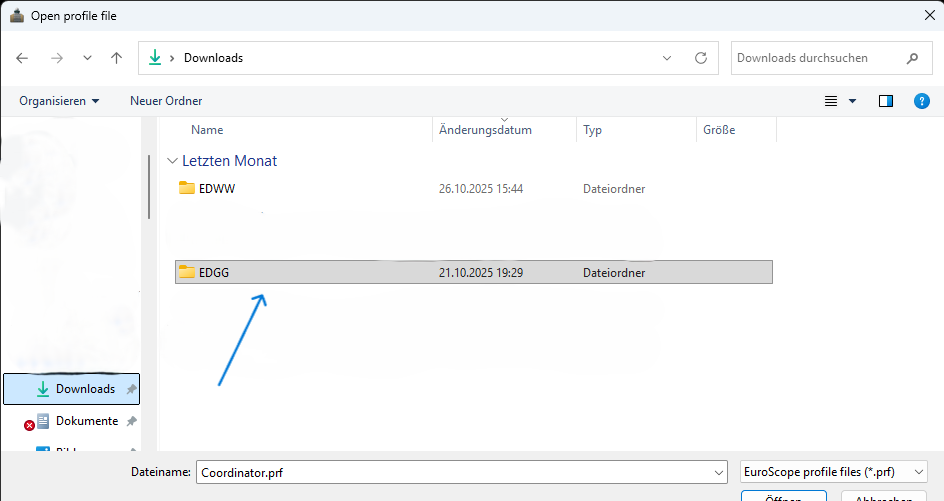
6. Click on all other folders in the extracted one, until you see .prf files. You can choose the TWR PHX Day.prf for the white mode and the TWR PHX Night.prf for the dark mode.
Connecting to our Network
- When everything started successfully and you are in EuroScope, click on the ,,Connect" button on the upper left of your screen.

2. Now you have a Window. Here, you fill in your Full Name (red arrow), your CID (blue arrow) and your password (green arrow). Next, choose which facility you want to be (yellow arrow) and your current Rating on our Network (orange arrow) (Usually the first Option if you are new). At the ,,Server" Tab you choose the Option AVONET or Avo (black arrow). And after you've done that, you enter your Controller Callsign (gray arrow). In my Case it´s EDDF_S_TWR.
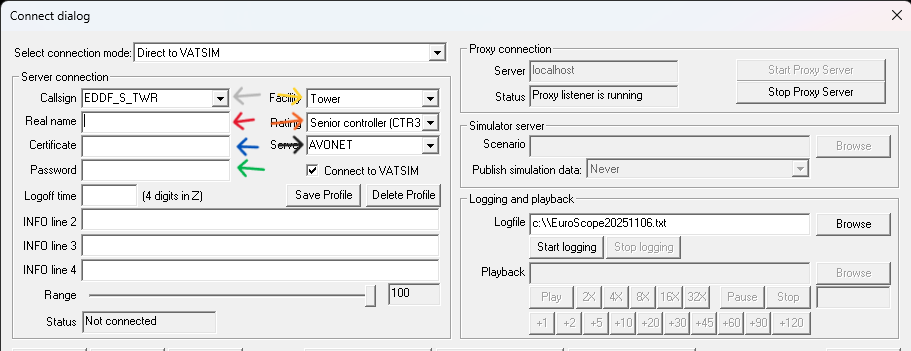
3. If you completed everything then you are ready to connect! Just klick on ,,Connect"
If a EuroScope asks you if you want to continue, you can click yes.
And now you should be connected with our Network!
If you don't understand, how Euroscope or beeing an ATC works or if you are new to aviation, contact support@avo-network.com or open a Ticket and we will Train you
No comments to display
No comments to display