
First Steps
(The tutorials for EuroScope were all made on a computer with the OS Windows)
Hello — welcome to this quick introduction on installing EuroScope for AVO-N.
Before we start: some antivirus programs and web browsers may mistakenly identify the installer files as threats and either delete them automatically or warn you when you try to download them. If that happens, make sure to allow the files (restore them from quarantine) or click “Keep”/“Keep anyway” when your browser asks whether you really want to download the file. The installation only works if these files are allowed.
The AVO-N Network is currently supporting only one ATC Client:
EuroScope V. 3.2.9
To install the Client, you need to Download our Installer here :
https://avo-network.com/euroscope-installer.exe
If you had EuroScope downloaded before, you need to uninstall it,it. thatOtherwise the programmInstallation works.will fail. Our Installer installs EuroScope again but with all the settings and moddings,modifications that youare canrequired joinfor the software to work with our Network. You can still join the VATSIM Network with this EuroScope. If you have a Rating in VATSIM, you can use this EuroScope. It works perfectly fine, nothing changed (besides that you can now join our Network).fine.
How to install EuroScope with our installer?
Here a Tutorial.
- Execute the downloaded .exe file
- Click on ,,Start Setup". Everything will now automatically install for you.

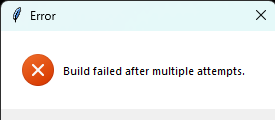
3. You wait so long,Wait, until everything has finished without Problems. ItIf CANyou happen,get any error message that you getcannot aresolve Message:yourself ,,Build failed after multiple attempts". If that happens, it is usually the case that everything was still installed correctly.
4. Now you download another File, the Patch-Main file. You can download it here: https://drive.google.com/file/d/1TsiwwVifagunUyhROLvp8OAbmsuwqtS3/view?usp=sharing
5. After Downloading, extract the Patch-Main.zip file and open the extracted folder (and the folder(s)like in the extractedpicture one), untilbelow, you seecan thejoin openfsd-patch.exeour file.
6.Server Executeand theask openfsd-patch.exefor file.help Now you see a window whereour you can write something.an JustE-Mail writeto a 0 (the number zero)support@avo-network.com and thenwe klickwill ENTERhelp on your keyboard. you.
7. Now the Window should have disappeared. If this happens, everything worked fine.
Congratulations! You installed EuroScope!
For Sectors or connecting to our Network, look up at the next Pages!
If you need help installing it, encounter errors, or have any questions,additional justhelp, createyou acan ticketjoin on theour Discord server,Server and theask stafffor help our you can write an E-Mail to support@avo-network.com and we will respond and assisthelp you aslike quicklymentioned as possible.above.